Further info and resources from my website

Showing posts with label ERP. Show all posts

Monday, October 17, 2022

Workday vs Oracle: A comparison of two cloud HR systems

PARIS
If Workday is the belle of HR systems, Oracle is undoubtedly her ugly sister. Having implemented both, let me share some examples to prove my point. (The Oracle system here is the one that Oracle actively sells, Fusion HCM Cloud, having retired its shoddy predecessor, EBS, and putting PeopleSoft on life support.)

OVERALL SYSTEM USER FRIENDLINESS
In the 20 years I've known Oracle, one thing has not changed: its scant regard for customers and the most obvious consequence, poor user friendliness, reinforced by a technology that seems always a generation behind others. Key example: In most consumer-grade platforms you can get further details and actions from a given object you're looking at by clicking on the dots that can be found around that object, usually at the upper-right corner (just check any Google page) which in addition you can check by opening another tab.

As expected from a modern HR system like Workday, if you're looking at an org chart and wonder who a specific employee is, all you have to do is right click with the mouse on the dots and that employee record opens in a separate tab for you to peruse their data. Once your curiosity has been satisfied, just close that tab and go back to where you were, the org chart, to continue the work you were doing there.


No such luck if you're using Oracle Fusion. This supposedly latest-generation tool will display a pretty average org chart (see below) and should you want to see the details of a given employee there's no capability to open a tab with that employee's file. You'll have to go back to the landing page, search for that employee and then open their record. And then if you want to go back to where you were (that is, if you still remember what you were doing) you'll have to start all over again, go to the org chart, enter the team you're looking for and the system will display the page you were on eons ago.


As for the search bar, Oracle technology is still stuck in a time warp: it is case and accent sensitive. So if you have an employee called Pénélope (in French) or Penélope (Spanish), and you enter "Penelope" you'll get no results. Obviously, no Oracle developer has ever used Google and other similarly ubiquitous internet tools. 

Menu jumbo-mambo


In Workday, action menus are organized alphabetically, which is the logical way to go about things on Planet Earth. The five most frequently used actions appear first, which is a great time saver. On Planet Oracle, actions appear randomly, making you waste quite some time going up and down and across the the screen in hot pursuit of the action you need. Nobody ever told Oracle that making life easier for the customer should be top priority.


SYNC ISSUE
We all know that "integrated" systems are rarely so, but what is amazing is that with Oracle even within a single module or feature thereof you still run into synchronization issues. Let's say that as a manager you perform an action in Workday (e.g., move an employee from your team to another) and this action requires an approval from another role (say, HR.) You log in as that HR person and here's the approval task awaiting you. Try and do the same in Oracle: you'll have a 3 to 5-minute time lag before the action travels from Manager to HR. In real life it doesn't really matter, but in project mode when you're constantly testing system setup and configuration it soon becomes bothersome and frustrating. 

Language enablement is another area where Oracle's sync'ing prowess is, shall I say, sinking? If you need to turn on a certain number of languages to go with your global deployments, with Workday it can be done in a couple of clicks and you see the results instantly. If you are unfortunate to have selected Oracle Fusion, you need to request language activation with Oracle Support. If you happen to do this on Monday, too bad, since this is done over the weekend. And since it takes half a day per language, your global implementation may have to wait an additional couple of weeks before you can go in and start checking translations.


SECURITY AND WORKFLOW
Whereas Workday can handle complex security requirements via domain and business process security, Oracle is very limited, often offering only global roles with no possibility to restrict per country/company or other criteria. In addition, whereas Workday proposes role names that are meaningful (Compensation Partner, HR Partner etc.) Oracle suggests roles with inordinately long names to remind users what that role can do (HRWithCompensationNoNotification). Can't get uglier than that.

Managing role conflicts is always an issue the more complex system implementation is. Whereas Workday has its own challenges, business process conditions work pretty well.  (Glossary: business conditions which allow you to decide how a specific role at a  specific step in a given workflow should behave.) Oracle, on the other hand, doesn't manage role conflict satisfactorily. A user case I struggled with during an implementation of Fusion  is the typical case of an HR user who is manager of an employee for whom he also plays the role of HR. If this manager initiates an action as manager and this action requires HR approval, you'd think since this manager is also this employee's HR they don't need to approve themselves. You'd be wrong! Oracle will make you do exactly that, which is absurd. You won't have this issue with Workday because its workflow configuration includes the possibility to exclude someone from approving a task if they are the initiator.

In summary, Oracle's  workflow capability can't hold a candle to Workday's which is extremely rich and allows for a level of granularity and sophistication Oracle customers can only dream of.

HALF-BAKED SYSTEM
Both Workday and Oracle provide various seniority dates to be used where relevant depending on whether one is interested in a hire date, or a company date, or time in a position etc. The similarities  end here: whereas Workday offers straight out of the box all these dates (as a user just go to an employee's record file and you'll see all the dates for that employee), Oracle will ask the user to launch a calculation for the dates they are interested in, otherwise they just remain empty not because some data is missing but because you haven't requested its calculation!!! Use case: You launch a promotion action on an employee and in order to help you make up your mind you need to know how long they have been in their current position.
In Workday, the data display effortlessly so you can continue with your promotion task.
In Oracle, you'll probably be met with an empty field, so you'll have to abort the task (remember you can't have two tabs or pages open at the same time in Oracle), go to the Seniority Dates screen in Quick Actions,  request a calculation, and then start the promotion task all over again. Awful user experience. Got forbid that at that moment you need to check another piece of information (say, compensation). You'll have to exit the promotion task one more time, go to Compensation, view the data and, if you still have not slit your throat in despair, launch a THIRD time the promotion task. One of the nuttier design decisions I've ever seen in my quarter-century experience of HR systems. 

Simple and available - the Workday way

DATA LOAD/MIGRATION
I could rant for days on how complicated data management is with Oracle, but suffice it to give one example: data inactivation. Let's say that you created a contract type which is becoming obsolete. To inactivate it you will need two rows: Start and End Dates of the period when the contract was valid and another row with the Start and End Dates when it is no longer valid. Now, since the End Date of Inactive is till the end of time Oracle requires you to put something like 4532. Why this date and not 9999 the way they do it at SAP? And why do we even need to put an End Date? Because Oracle is still run by the same people who created the relational database and keep on thinking along the lines of this technology that harks back to the last millennium. 

QUESTIONABLE DATA MODEL
Every vendor has their own data model which has been a perennial issue in system-to-system integration. None is worse than the manager data model as pursued by Oracle versus Workday. With Workday, a manager is appointed on an organization (or team) and any employee part of that team will share the same manager. Clear and straightforward - even if some first-time Workday users may be taken aback at the logical consequence of this choice: a manager will always sit in an organization above the one holding his/her team.  An employee is hired into an organization. With Oracle, things are illogical and a source of endless confusion to users: a department with 3 employees can have 3 different managers since employees are linked directly to a manager, and in this case each can have a different manager. A department manager can be assigned (as a system admin task) but only employees without a directly assigned manager will inherit that departmental head as manager. You can easily see how ugly this can turn with different employees having different managers, some sharing the same or having none whatsoever.

Calculated Fields vs FastFormulas
In short, both are ways to write custom rules such as a calculation of a compensation element or a condition/eligibility rule to apply to who should get that compensation component. And that's where the resemblance between the two stops. Whereas Workday has innovated with an easy-to-use feature whereby you assemble your rules from different objects Lego-like, Oracle is still stuck in last millennium's technology -hardly surprising when you know that FastFormulas are a transplant from Oracle's much-hated EBS HR system which only a database nerd can make sense of. See below screenshot from the two to get a sense of  how Workday has managed to become the default tool of HR users. 


Today's tool vs yesterday's

Custom Objects vs Flexfields

Here again, we have similar objects aiming at extending a system's capabilities beyond what was initially supplied by the vendor. But whereas Workday makes it easy to build, use and maintain such objects, Oracle's Flexfields have serious limitations. One of the most egregious being that on any screen it is linked to, a Flexfield appears systematically at the bottom. To give you an example, let's suppose that in a Hire screen in addition to the standard "Business Title" field, you want to add a related field called "Local Business Title". Since Oracle doesn't offer a second such field you'll have to create it via Flexields. So be it, except that being a Flexfield it appears all the way at the bottom of the screen, probably next to a data section on addresses or blood type which have nothing to do with it. Very confusing to the user. Worse, if the Flexfield is to be filled with a value depending on what you entered in the standard field, you'll have to scroll all the way up to remind yourself what you entered and, having duly taken note of it, scroll all the way back down to enter a value for the second, related, object. In terms of customer experience, it's simply awful, but on a par with Oracle's products.

DOCUMENTATION
The differences between the two vendors couldn't be starker: whereas Workday has a flourishing Community where you can find an easy answer to set-up documents, share best practice ideas with other customers, suggest enhancements to the tool (and track its status), Oracle is...well, Oracle. Its Help Center is anything but helpful. All you get is some marketing PowerPoint presentations, fluffy documents, links to attend Events and that's it. If men are from Mars and women from Venus, well Workday is clearly from Planet Customer and Oracle is still stuck in its Planet Larry Ellison - or Technology: the two are interchangeable.


So, why do some companies buy it?
I could go on for hours and inflict thousands of additional pixels on your retina, but I think you get my drift. Which prompts the following question: with Workday being manifestly so superior to Oracle in every way, why do some customers still buy Oracle for their HR needs? 

First, you have to realize that only current customers (those who are using Oracle database or middleware or Financials or legacy EBS system) have any interest in envisioning the possibility of purchasing Oracle's Fusion system. 

Second, a majority of Oracle customers (both PeopleSoft and EBS) moving their HR system to the cloud do it not with Oracle Fusion, but with...Workday, proof enough of what they really think of their current vendor.

Third, as for the minority who decides to stick with Oracle, you may still wonder that only masochists would spend good money on bad technology. And here you'd be more right than you may think. When I referred to these customers as buying Oracle Fusion HR, actually I wasn't being accurate because one of Oracle's (many) dirty little secrets is that these customers actually don't buy Oracle HR because ...they get it for free! Oracle just tells them that if they take Fusion Financials, they'll get HR for free. Most customers make the decision that sure it looks ugly but you don't look a gift horse in the mouth, do you? So, they decide to plod on and make the best out of a bad situation.

It's not dissimilar to those millions of consumers  who have a regular meal at McDonald's knowing it's not good for their health (or their palate) but that consideration is outweighed by price and convenience. 

So, my advice to Oracle customers as they head to Oracle CloudWorld is to remind them of that old phrase: you get what you pay for. And as you've seen it in this analysis, there's no denying it: Workday blows Oracle out of the water.

Friday, June 3, 2022

When Workday’s “Power of One” fails: An example from Payroll-Compensation integration

LONDON

At the turn of the millennium, PeopleSoft, the then-undisputed HR tech leader, asked me to join them as Product Strategy Manager to help them with their European payrolls. Until 2001, PeopleSoft only had payroll for North America. For other countries the spin was that what really mattered was to have all your employees’ key data in one global system (Core HR) which you would then interface to various downstream systems (Payroll, Finance, Time Tracking, Expenses etc.) depending on needs. The underlying message was that Payroll was just an engine, not a strategic tool and therefore there was little value in having it in the same system. Actually you didn’t even need to have it in-house, just outsource it to ADP and the likes.

That was until PeopleSoft realized there was a lot of money in the Payroll business and that there was a lot of value in a Payroll-Core HR/Compensation integration after all. That’s when they built a global team, of which your humble servant was part of covering France and Spain. In a payroll blitzkrieg unheard of in the industry until then and since, we brought to the market close to a dozen payrolls (France, Spain, UK, Germany, Switzerland, Netherlands, Japan, Australia and a sprinkling of other countries).

Suddenly, in a not-so-subtle move that I found highly entertaining, Payroll/Compensation integration was all the rage. At every meeting with customers, at HR tech conferences, in press and analyst encounters, our message was that an HR system without payroll wasn’t worth the pixels it showed on your PC monitor. You needed the Payroll module as a mandatory accessory to your global Core HR/Compensation.

Fast forward two decades and to today’s indisputable HR Tech leader, Workday. Just like its forerunner, Workday started with a limited number of payrolls (and no finance tool), so it was all about having a global core HR system, the rest was dismissed with a wave of the hand as optional, ancillary and unimportant. Then came finance and the slow drip feed of payroll and, lo and behold, out of the cloud emerges the fundamental, indispensable need to be able to integrate both within the same system with the same data model and UI (which now goes by the fancy term of UX). Workday coined the phrase of the Power of One which as they say in their marketing material does not “require any process or configuration changes on your end”.

Well, as we all know, there’s marketing and there’s the truth. Or, to paraphrase Mark Twain, there are three types of lies: lies, statistics and software marketing (truth be told, Workday is certainly not the most egregious perpetrator here; the Oscar probably goes to Oracle and their fanciful claims about basically every product they throw at their customers.)

But, back to Workday, since this post is about Workday. There are many examples where the Power of One is contradicted by the reality of many. The one that I want to focus on deals with one of my favorite Workday and HR topics: Compensation under its various guises: Core Compensation, Payroll and Compensation Review.

Compensation Review is the process whereby you increase employee salaries and award them bonuses and stocks, usually once a year, based on their performance (and the company’s.) To run this process Workday has a pretty strong module called Advanced Compensation, on which I got certified in 2019. I’m not going to inflict boring technical and business details on you, but suffice it to say that in order for a bonus to be calculated you need a reference compensation if your bonus is going to be a percentage rather than an amount. That reference compensation (which is called Compensation Basis in the Workday lingo) is usually the standard salary (Total Base Pay in Workday-ese ) or it can be created from scratch to include any compensation component such as allowances as long as these compensation components are…available in Workday. If they are not (such as overtime which is often part of another tool, Payroll) then you need to load those amounts back into Workday using some esoterically named Eligible Earnings Override.


The villain revealed

So far so good. Everybody understands that Workday cannot retrieve a data not held within Workday. And since a majority of Workday customers use third-part payrolls (especially outside North America), it is perfectly understandable that these amounts need to be extracted from your payroll system, appropriately formatted  and then loaded into Workday for Advanced Compensation’s consumption.


Except that, and here’s the rub, there are many customers who use Workday Payroll. In that case you’d assume from Workday Payroll to Workday Core/Advanced Compensation the data should flow as easily as the River Thames under London Bridge.

Wrong!

Rather than being able to point your bonus calculation to the relevant Payroll earnings (or sum thereof) you still have to go through the whole cumbersome task of extracting/preparing the data in payroll, then loading it into Workday, then going and referencing it for your bonus calculation.  Where is the Power of One? Looks more like the madness of many as we all know how messy integrations are. When you’re using separate systems, no queda más remedio as my Spanish friends would say, you have to build that interface. But why would you have to do that when you’re running the SAME system? That’s what you were told and sold: buy one and no integration need, right?

I heard that Workday is planning on fixing this, which is long overdue. But why did you even have the issue in the first place?  Bad product design happens everywhere, even with the best. But then be a little modest when taunting your Power of One which has been found lacking.

And don’t get me started on absence management. With Workday you can track your employee absences in Core HR, in Time Tracking and via Payroll as well. In Core HR you have it more than once: the standard Absence features and the Leave of Absence functionality. Like estranged siblings, neither seems to be aware of the other’s existence. Another product strategy gone mad.

Workforce Planning? Integrated only in name. Another Power of One derailed.

Alright, I thing I’ll stop here. You get my drift. Time for Workday to spend a bit less time on Marketing and more on Product Strategy and Development.


(This is the latest in a series of posts on Workday. The most popular feature below. Many more can be found by searching chronologically the list of posts on the right-hand pane.

-Feb. 2021: "10 features Workday should deliver - yesterday!"

-April 2016: "SOW - A Comparison of 3 Global Cloud HR vendors: SAP, Oracle and Workday"

-Feb. 2015: "An open letter to Workday's Bhusri and Duffield: Time to fix Europe"

-May 2011: "PeopleSoft vs Workday - Old vs New" )


(The Global HR Technologist is enjoying a 4-day Jubilee Holiday in London, a place he has been visiting relentlessly on business and pleasure for over three decades now, going back to when he was a teenage student in Britain under the Iron Lady’s rule. “When a man is tired of London, he is tired of life; for there is in London everything that life can afford,” said Dr. Johnson a couple of centuries ago. So true now as then.)

Sunday, January 20, 2019

Of cars and HR software: Metaphor-based HRIS tips

PARIS
Remember that great song "Why Can't a Woman Be More Like a Man?" from that wittiest of musicals, My Fair Lady? Well, for the past couple of decades that I have been in the HR technology industry, I have been asking myself a similar question: Why can't my HR software be like a car? Throughout my career I have peppered my articles, presentations and meetings with car metaphors to drive the various points I was trying to make. (Here's the scene from the 1964 movie with Rex Harrison singing, well more like uttering, the song.)

You'll find hereafter some of the most frequent ones. Note that most would apply to enterprise software, not HR only; however, since I am an HR technology person through and through, you'll hardly be surprised that's my focus.

System Evaluation
This is the oldest car-metaphor case I can recall, having used it for at least 20 years. In the latest 1990s when I started out as an HR system analyst-cum-consultant spending most of my time advising French companies on which HR system to select, I would use this metaphor quite often. Actually so much that I put it early on in my book, High-Tech Planet. Here's the relevant excerpt of the metaphor which I still use to warn my clients off including ever single product specification whim that might cross their mind just because "it can be useful."

Having four wheels on a car rooftop is certainly useful in case the car were to turn over; but since no car maker offers that, it would be a waste of time to include that feature in a list of requirements, especially when every business process is now available in a computer system developed, sold and serviced by countless companies. Delphi Tech was one of such companies. Actually, it was more than just one of them. It was the biggest, the largest, the best-known one: indeed, as Dick claimed, Delphi had to a large extent created the business of corporate software, or at least contributed to its development. It was, as Dick would say, the Rolls-Royce of computer systems.  (High-Tech Planet: Secrets of  an IT Road Warrior, 2010 edition, p. 3.)


I also warn against using SIs (system implementers) as selection advisors for obvious reasons: SIs tend to focus on one or two systems; many, especially the boutique ones, are actually one-trick ponies. If you only have experience driving one or two cars, you will only recommend those ones. Or using research firms like Gartner who have limited, if any, HRIS implementation experience. This is like recommending a car based on several great features, but forgetting to ask the prospective buyer whether they can drive.

And beware overkill: When famed French soccer club Paris-Saint-Germain bought Workday, considering their small headcount and limited resources, it was clearly like buying a huge bus just for you, your wife and your two kids. Or like buying a Lamborghini to avoid walking on your driveway to your mailbox and back.

Finally, I strongly advise against falling for what I call the "critical capabilities" trap. If you only focus on these, you are likely to overlook other useful aspects and not be able to really pick the system that is best for you. Such an approach is as smart as when buying  a car to look only at the number of wheels and car paint. Three cars can all have the same features (tires, automatic transmission, air conditioning), but when you use them you will know which one is better. 

Product Design
As someone who spent a big chunk of his career in product strategy and management roles (at PeopleSoft and Fidelity Investments' HR Access) I am still amazed at how HR system  vendors make a point to diverge on fundamental design choices. If SAP decides that one process will require different screens, you can be sure that Oracle would prefer to have just one screen (albeit a long one obliging the user to scroll down endlessly) while Workday would probably prefer to have several tabs on the same screen. This can be very confusing for users who, as part of their daily HR tasks, have to toggle back and forth between several HR applications. Wouldn't it be nice if they were all designed along similar lines? 

Just imagine that if Ford puts the brake pedal to the left of the accelerator, so Renault puts it to the right. If BMW  uses a steering wheel to enable the driver to move the front wheels, so everyone else must use levers and sticks and chains. T
here would be almost no learning-curve effects either from a manufacturing or a usability perspective. And yet, HR software vendors do exactly that, which is quite insane, especially when you know that the musical-chairs game so prevalent among software executives means it's basically the same folks who oversee products across companies. 


Change Management
What many end-user companies are still grappling with as part of their new HR system implementations, especially in the cloud, is the right mix between configuration and training which now goes by the fancy name of change management. As I often tell my client, redoing you car's body and changing the engine would be of little use if the driver is incompetent. If you never learned to drive, buy a BMW and then crash it into a wall , how is that the car maker's fault? 


And when a client insists on implementing the same inadequate process again and again, I warn them against reinventing the flat tire.


HR System Implementation
There are many companies that in their move to cloud HR adopted the approach whereby they start with the low-hanging fruit of talent modules before, like an afterthought, implementing Core HR. More often than not, the added complexity doesn't make up for the lower risk. Core HR is your HRIS engine, without it your global HRIS simply won’t work. It is like trying to drive without a steering wheel: you’re not going to go far.

Discussing the Implementation phase one is often reminded that the Design phase seems never to have been closed since users will always try until the very last moment (and even after!) to change the design. This is very dangerous and akin to changing the tyre while driving the car: recipe for disaster.

Another maddening aspect of requirements is that companies often come up with contradictory requirements. Imagine that you're driving a car and when you arrive at a crossroads you ask for instructions, "left or right?" "Both," is the answer you get. 


Cloud/SaaS HR for the dummies
Surprising as it may seem, there are still many corporate executives involved in on-premise-to-cloud transition projects who are still struggling with the cloud concept. This is where I probably make the most of the car metaphor. Starting at the evaluation stage, I warn my clients about  dinosaur vendors like Oracle who try to make us believe that they can tweak on-premise PeopleSoft into a cloud offering. It's like saying that if you affix wings to a car and add  a pointed nose along with powerful reactors, and find a way to hide the wheels, you can turn a car into a plane. It just won't fly - in more sense than one.  

Or putting a new body on a  30-year car. Would you fall for that?

If you still decide to take the risk to adopt half-baked products, then be prepared to fork out the funds needed to have onboard several consultants for a long period of time and whose function will be to fix the inevitable bugs and issues that are bound to arise. Remember that when the first automobiles came, owners needed to hire a mechanic full-time because those first cars had a bad habit of always breaking down.

For those who can't wrap their head around capex and opex (that's capital and operation expenditure to you) I explain that Saas is like leasing a car versus buying it. When they compare that with the millions they used to pay upfront just for the honor of being an SAP or Oracle customer, these executives' eyes brighten up immediately.

One car metaphor I used a lot when the cloud model arrived, and less so now as the cloud has gone mainstream, aimed at helping users to understand the key difference between traditional ERP (on-premise) and the cloud (SaaS based.) In order to convince the pro-ERP camp I explained to them they can't stop progress.  When automobiles arrived, they coexisted for a while with horse-drawn carriages before these got ditched because everybody saw that cars were faster and more practical. As an early advocate of the cloud model, against Oracle's (in)famous scorning of the cloud, I am glad to see that I eventually was vindicated by the market. (See my Jan. 2011 article, "Can software dinosaurs reinvent themselves as cloud-based vendors?")

One concept that, surprise, surprise, dinosaur vendors  try to push is the hybrid system of on-premise + SaaS system supposed to work in perfect harmony like hybrid cars. I debunk it by pointing that it's like saying, "Oh you don’t like the engine in your car, no problem, we can remove it for you and attach the car to two horses instead." Really!

Another fallacy about hybrid HR systems is that customers are led to believe that it's the best of two worlds. Come on! Will you really buy half of a Porsche and couple it with half of a Ferrari? 

SaaS, a relatively new concept,  is often confused with BPO (outsourcing the full process, be it payroll or recruiting.) When a client tells me they are not sure whether they should move to a SaaS  vendor or a BPO one, I tell them they are mixing things: First of all, you have to analyze and make a decision whether you want to run your full process inhouse or out. And only then can you decide, if inhouse, whether Saas or on-premise; and, if outsourced, then what vendor. In car terms, it is like saying, " I’m tired, I can’t walk to work, so I’ll invest in either a bike or a car." Well, they are two different tings, you should be either comparing bike/motorbike or motor bike/car but a bike vs. a car doesn't make sense. Like the proverbial apples and oranges.

Of second-hand cars
Of  course, no car metaphor would be complete without the time-honored used-car example. When Oracle provides its prospects with heavy discounts to adopt Fusion, I remind them that you get what you pay for: If the price of a second-hand car ("used car" to most Americans) is too good to be true, it's probably because it is neither good nor trueAlso, you buy a second-hand car if  you’re a good mechanic (in HR technology words, you have enough in-house skilled resources), because then you can fix it. Otherwise, you’re on your own: Compare this with the first-automobile and mechanic metaphor a couple of paragraphs before.

Sales 
I could spend gazillions of pixels and tire your eyes out of their sockets decrying software sales tactics (the object of my aforementioned book.) One particular tactic which I recently saw  on a global HRIS project with payroll outsourcer ADP was when the vendor stated they were willing to bid with SAP SuccessFactors Core HR (Employee Central) but on the condition that my client bought two payrolls from ADP. 
I shot back at them, "How would feel if your car dealer offered to sell you a car only if you accepted to also buy two bikes?"


Vendor Management
Despite the Buyer Beware motto, customers  are entitled to escalate issues, especially when a promised feature is not working as touted in sales demos - or, worse, is not available. However, I find it misguided from some customers to focus on minor issues while not seeing the bigger picture. It is akin to buying a car that is  bigger, nicer and faster and yet spend an inordinate amount of time on small imperfections. As in life in general, you should choose your battles wisely: know which ones are worth fighting, and which ones should not be launched.

HAPPY NEW YEAR TO ALL!

This is the latest in an HRIS Selection & Implementation Tips series. Previous posts included:
- April 2018: Cloud HR Implementation Tips: Focus on Migration
- Jan. 2016:  Pricing and Contracting with Your Cloud Vendor: Tips and Tricks
- Jan.2013:  An HR leader's Top 10 New Year's Resolutions


(The fact that the blogger-analyst-consultant has been spending the better part of the last year and a half on implementing a new global HRIS for one of the world's largest car makers is obviously a cute coincidence, since I have been using these metaphors for two decades now.)


Monday, April 30, 2018

Cloud HR Implementation Tips: Focus on Integration and Migration

PARIS
 Most discussions on implementing a new HR system, which for the past years has meant a cloud-based one, tend to focus on the functional side of things, that is business requirements as covered by a single system. Discussing what processes will be re engineered or moved as-is, what system to evaluate and select or even how to overcome change resistance are often considered as nobler than the nitty-gritty  technical aspects usually referred to as “integration”, although I prefer interface since that is what it is: interfacing to third-party.

In the brave new world of cloud systems, the assumption touted by most vendors has been that the integration conundrum would be solved by the native vendors in a much more satisfactory way than it was in the dinosaur era of traditional ERP. Well, nothing is farther from the truth if only for two simple facts:

1. In my 20-year experience of the HRIS world, I have yet to seen a company (and certainly not a global one) using a single platform for all its HR needs. 

2. From time immemorial HRIS vendors have each had their own data model and despite all the talk about convergence that is still the same basic reality. 

So, how should you go about integration when embarking on a new HRIS project? First you need to realize that there are several tasks/phases that make up implementation activities. This post will focus on the ones mentioned in the title: Integration and Migration. Second, these two tasks tend to be considered as "technical" but the business impact is such that it would be counterproductive for SMEs or the business side of things to relinquish full control

INTEGRATION
Deciding what is in scope and what is out is one of the most challenging issues in any HRIS project. If you overindulge yourself you may bite off more than you can chew, a recipe for disaster. But leaving too much out (Recruiting*, Payroll, Time Management*) means interfacing to all these different systems and that's where the big headache starts: How to make different systems with different data models talk to each other in a meaningful way?

Particularly vexing is the situation faced by many companies  which have never had a single global HR system of record and whose users realize that moving to the cloud means having, at least, two systems where they previously had one: the old single HR-cum-payroll system now becomes a modern, cloud-based HR system interfaced to payroll. Where I used to create my positions, hire employees, define their compensation, and produce their payrolls in one tool, now  I have to do it using two user experiences. Toggling back and forth between two tools may be considered by many as a step back.

To ensure user adoption and minimize risk, pay particular attention to the following:

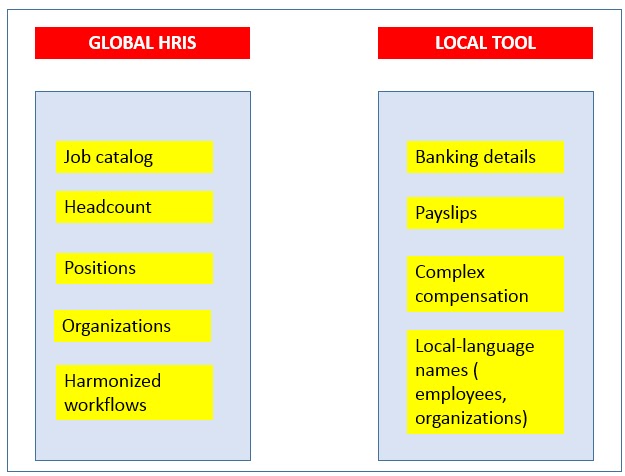
  • What data to move to the new HR tool and what should remain in the legacy tool (see the below table for help on deciding which is which)? You can decide that structural data (organizations and jobs/positions) stay where they are, but employee data are moved to the new tool: analyze the pros and cons of each carefully. Particularly wrenching is when the new system offers some data or feature that your local tools cannot accommodate and in order not to break down what has worked fine for so long, you have to let go of a feature you were hoping to use (and loved in the demo when you evaluated vendors.)


  • What direction should the flow go? Is your new tool going to be the master for all things HR? Will some data be updated in the legacy tool and fed back into the HR system of record? Will some process flow change directions over the course of the project? That could be useful to minimize risk but it is bound to add to complexity.
  • What am I to do if my legacy, local tool is better at some feature than the new one? For instance, in my local tool, in the Address section, I have a City field with a picklist (often the result of heavy customization) , but the new tool doesn't offer a list of values to choose from (welcome to the wonderful SaaS world!) If a user misspells a city name or use a local one (say, Köln instead of Cologne) the downstream  system won't recognize it and will throw in an error: no address means no employee. And if this employee is a manager all the workflows that require his or her approvals will be stuck. The business impact of such a situation can be quite serious.
  • How often do you expect to send data via the interface?  Once a day? Several times a day? Once a week? This is hardly an academic issue. If you update your employee data several times a day, you may want to just send the most recent file. Some interfacing tools allow you to send just what has changed (the "delta" file in our jargon), while others will send the whole file. 
  • A far from unimportant question is whether you will interface straight from the new system to the legacy tool or whether you will go through a third tool in between. I have worked on several SAP-to-cloud conversion projects and often the customer would rather retain a mini HR master that would be fed from the new HRIS and, in turn, would feed the downstream system (both HR or non HR such as finance or expenses.) The advantage of such a scheme is to lower the risk and the interface complexity since you focus only on one type of interfaces and don't have to rebuild all the other "pipes."

MIGRATION
Since I'm writing this piece having dummies in mind, I may be stating the obvious for many but I am still surprised at how many people confuse the two terms and activities. Although the two may overlap they are fundamentally different: both relate to sending data from one tool to the other, but they do it at different phases of the project: Migration is about loading data before you go live (it is therefore a one-off exercize) whereas Integration sends data on a constant basis after Go Live.  

As with Integration, some major decisions have to be made, carefully weighing thepros and cons of each:

  • The first one is about history: I have spent countless hours/days/meetings with stakeholders to analyse and explain history decisions: Many users, loath to leave their comfort zone, expect to get in the new systems all the contracts an employee has ever had, all the jobs he's ever held etc. Technically it can be done, but it is complex and expensive, so you have to explain to them that the costs far outweigh the benefits, and that it is better to just load active employees and the most current job, or at least not going back more than a year. But, again, analyze your business carefully: if your business has high seasonal turnover, and the regulatory environment in the country/ies you operate in, require you guarantee that full seniority is maintained, then you may have to load terminated employees as well.
  • A key aspect is the source of the data: If you already have a global HR system of record (think Oracle or SAP) much of your data will most likely be stored in that legacy system (although not for all your countries, some smaller ones may be outside.)  The good news is data conversion from one tool to another is much easier to do than from multiple sources. The bad news is that in reality SAP and Oracle (both EBS and PeopleSoft) are ancient technologies, and often do not hold a lot of local data: For instance, they may hold your permanent employees, but temporary employees are managed in the local tools. You will then have to migrate them from these ones: multiple tools means added complexity, cost, energy and ...time, that commodity so precious in any global HR system project. Hard decisions to make here, based on the real (not perceived) value of having, say, banking details in one single global system or in local ones: if your employees are used to self service then the former makes sense; if HR will continue to update it directly, then it can remain in the  local tool.
  • A key part of the Migration exercize is to validate that the data has traveled safely, hence the importance of checking it. Remember GIGO? Garbage In, Garbage Out? If your data is w in the source system, it is highly unlikely it will arrive cleaned in  the target tool. Do yourself a favor and clean up your data in your upstream tool.
  • I have written a lot on system evaluation, and this is where bad decisions made at that phase will impact your implementation: If you have been negligent or ignorant about your business, and not realized how much historical data you will need,  you may be in for a big surprise when you reach out to your vendor (systems integrator) and are hit with the additional costs of a change request. So, as in anything else in life, the earlier you think about all possible options, the better it would be. Of course, many customers make the buying decision with scant regard to implementation and  live to  be sorry at their shortsightedness.

As you can see from the above examples, the impact of misguided integration and migration decisions can hamstring your business quite significantly. Undervalue these twin sisters at your own peril. To paraphrase a well-know expression, Integration and Migration are too serious issues to be left to IT: HR, as the face of the business, should own it and pay particular attention to it in order to maximize chances of success. 


*The blogger positively hates the New Age terms of Talent Acquisition and Workforce Management

**The blogger, in his Advisor/Consultant/Project Managercapacity, is currently busy with the post-design phase of one of the largest Workday projects in the world for which he has been clocking in an impressive amount of frequent-flyer miles.